
This wasn’t straightforward because the broadcom wifi NIC is nto supported by either Ubuntu or CentOS. These instructions are for Ubuntu.
Here’s the /etc/network/interfaces file
# This file describes the network interfaces available on your system
# and how to activate them. For more information, see interfaces(5).

# The loopback network interface
auto lo
iface lo inet loopback

# The primary network interface
auto eth0
iface eth0 inet static
	address 192.168.1.10
	netmask 255.255.255.0

# wifi
# auto wlan1
iface wlan1 inet manual
	wpa-driver nl80211
	wpa-roam /etc/wpa_supplicant.conf

iface default inet dhcp
and wpa_supplicant.conf
ctrl_interface=/var/run/wpa_supplicant
ctrl_interface_group=netdev
update_config=1
network={
    ssid="Snowman Wireless"
    psk=xxxxxxxxxxxxxxxxxxxxxxxxxxxxxxxxxxxxx
	scan_ssid=1
        proto=WPA
        key_mgmt=WPA-PSK
        pairwise=CCMP
        group=CCMP
}
You get the psk value from wpa_password, and it is different on each host.
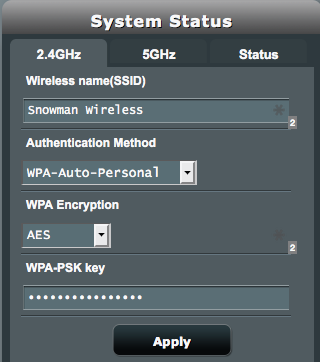
Which matches my Asus Wifi station with the settings:
In my case I have a Broadcom 4311 which required me to run:
sudo apt-get install firmware-b43-installer
which I found on http://askubuntu.com/questions/55868/installing-broadcom-wireless-drivers.